
Free, Plus and Gold compared
What you get on Murudo for free, what Plus adds and what Gold adds on top of Plus, in one table.
- Android app
- Murudo Web
Murudo is free to use: you can build a profile, like people, match and chat without paying. Murudo Premium has two plans. Plus removes the daily like limit and shows you everyone who liked you. Gold is everything in Plus, with more Daily introductions, more boosts, the highest priority and Stealth Mode.
What each plan includes
| What you get | Free | Plus | Gold |
|---|---|---|---|
| Daily introductions each day | 1 | 3 | 5 |
| Likes | A set number each day | Unlimited | Unlimited |
| See who liked you | Blurred until you reveal one | Everyone | Everyone |
| Advanced filters | No | Yes | Yes |
| Rewind your last swipe | No | Yes | Yes |
| Direct reach-outs to people you liked | No | Yes, a limited number | Yes, a higher limit |
| Boosts included | None | 1 with a 7-day pass, 4 with a 30-day pass | 2 with a 7-day pass, 10 with a 30-day pass |
| Stealth Mode | No | No | Yes |
| How early your profile is shown | Standard | Priority | Highest priority |
A few notes on the table:
- Free likes reset every day. The app tells you when you have used them. See I have run out of likes.
- Included boosts come only with 7-day and 30-day passes. A 24-hour pass and a Forever plan include none. See Boosts included with your pass.
- Priority means your profile is shown to people earlier in For You and Daily. It does not promise likes or matches.
- Each feature has its own page: See who liked you, Advanced filters, Rewind, Direct Reach-outs, How Daily works and Stealth Mode.
See the plans in the app
- Open Profile and tap See Plans.
Under Choose your tier, tap Plus or Gold. The list below changes to Plus Features or Gold Features.
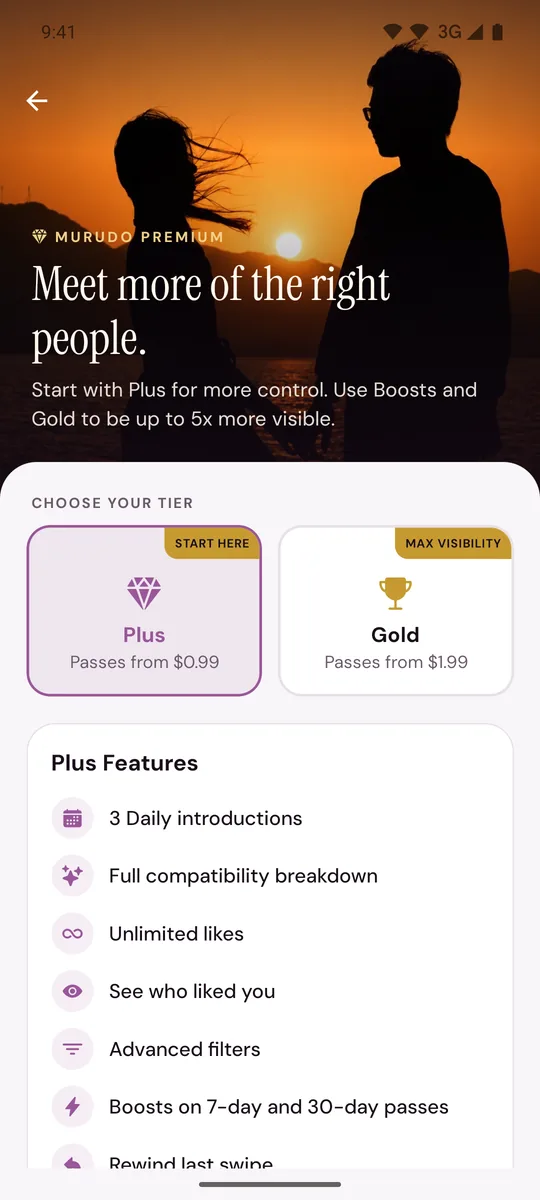
On Murudo Web, open Profile and tap See Plans. Both plans are on one page, as Murudo Plus and Murudo Gold.
How you buy a plan
Plus and Gold are sold as passes: 24 hours, 7 days or 30 days. Prices are in What Murudo Premium costs. There are also Forever plans, paid once.
Moving from Plus to Gold
If you see a button that starts with Upgrade to Gold on the Premium screen, you can buy a Gold pass while you still have Plus. Gold starts as soon as the payment is confirmed. Your Plus time is not paused and is not added to the Gold pass: it keeps running in the background, and if any is left when Gold ends, you are on Plus again until it ends.
Updated 18 October 2026