
Undo your last pass or like with Rewind
Rewind brings back the profile you just passed or liked in For You. It is for Plus and Gold members and works for 30 seconds after the tap.
- Android app
- Murudo Web
Rewind brings back the last profile you passed or liked in For You. It is part of Plus and Gold, and it only works within 30 seconds of the tap, so use it straight away.
Use Rewind
- Stay on the For You tab after the pass or like you want to take back.
Tap the arrow at the top right. It is the first icon in the row and appears once you have passed or liked someone.
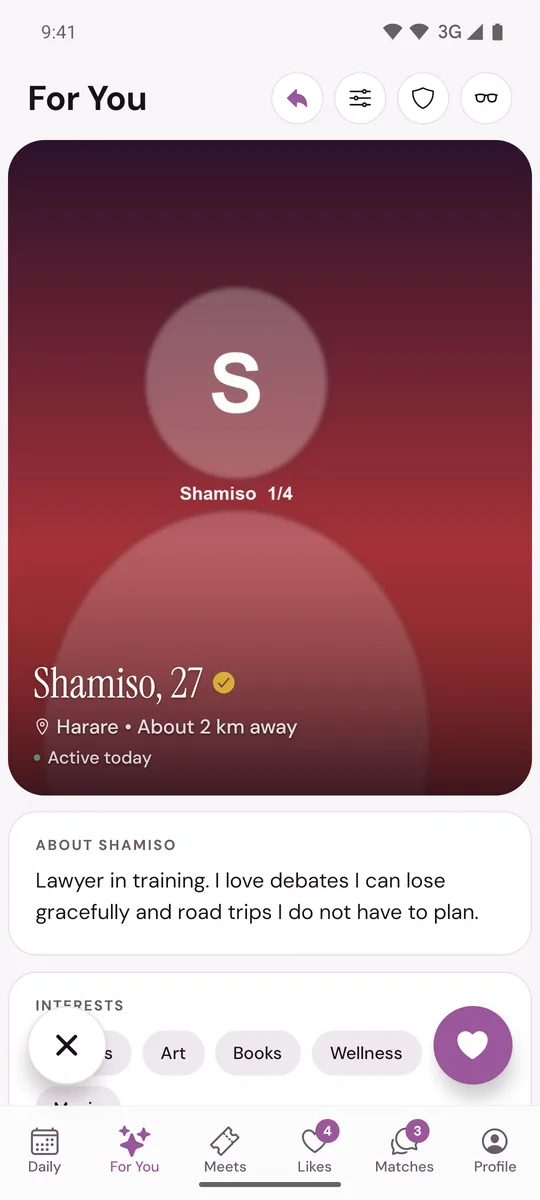
- The profile comes back. Like or pass again.
Rewind undoes one tap at a time, the most recent first.
What Rewind does
- It undoes a pass or a like. A like you rewind is taken out of the other person's Likes.
- If your like made a match, rewinding within the 30 seconds normally removes that match too.
- If the app says Can't undo this like instead, the like and the match both stay. Unmatch from the person's profile if you need to.
What it cannot do
- Go back further than 30 seconds. After that the app says Undo unavailable. A like stays sent. A profile you passed can come back in For You later.
- Undo anything outside For You: Not for me in Daily, a pass in Likes, a block or an unmatch.
If you are on the Free plan
The arrow is always there. Tapping it shows Rewind with Plus, with View Plus to see the passes and Not now to close. See Free, Plus and Gold compared.
On Murudo Web
In Discover the same arrow is the first icon at the top. It lights up after you pass or like, and a message says Undo successful when the profile is back.
Updated 13 October 2026