
Reach out or pass on a Daily introduction
Tap Reach out to send a request with an optional message, or Not for me to close the introduction. It becomes a match only if they are interested.
- Android app
- Murudo Web
Every Daily introduction has two buttons. Reach out sends the person a request, with a message if you write one. Not for me closes the introduction. A request becomes a match only if the other person is interested.
Reach out
- Open the Daily tab.
Type a first message in Add a message (optional), up to 500 characters. If you leave it empty, Murudo sends "Hey" for you.
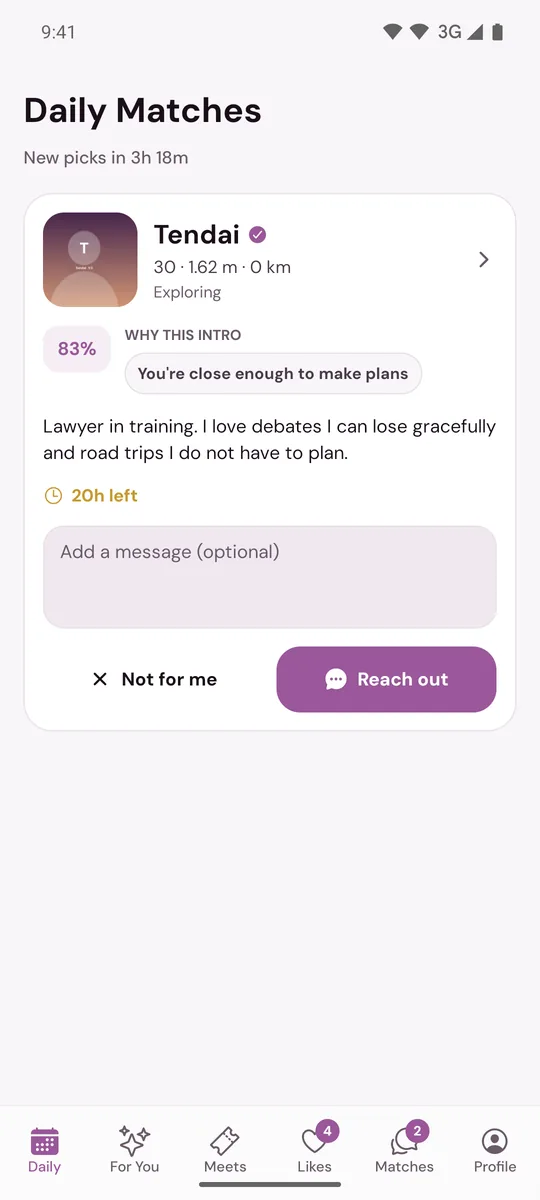
- Tap Reach out.
You see Request sent. The person finds your request and your message in their Matches tab, under Daily, and chooses Interested or Not interested. If they choose Interested, you match and your message is the first one in the chat.
To read the full profile first, tap the card. On the profile, the heart at the bottom sends the same request and the X is the same as Not for me. The profile has no message box, so write your message on the card before you open it.
Pass
Tap Not for me. The card closes and the other person is not told.
Good to know
- A Daily reach-out does not use one of your daily likes.
- Introductions run out. The card shows the time left; once it expires you can no longer reach out.
- A request you sent runs out too. If the other person does not answer within 20 hours, it expires.
- You are not told when someone chooses Not interested. The request simply never becomes a match.
- If the app says Message not sent, the introduction has usually expired or the person is no longer available.
Requests sent to you
When someone reaches out to you from their Daily, it appears in Matches, under Daily. On the Free plan you see a limited number of these at a time and the rest are locked. See Daily requests in Matches.
On Murudo Web
The Daily tab at murudo.co/app has the same message box and the same Not for me and Reach out buttons.
Updated 13 October 2026