
What "Active today" and the other activity labels mean
The small label on a profile shows roughly when that person last used Murudo. What each label means, where it appears and how to hide your own.
- Android app
- Murudo Web
The label beside the green dot on a profile tells you roughly when that person last had Murudo open. It is never an exact time. You can hide your own with Show last active.
What each label means
| Label | The person last used Murudo |
|---|---|
| Active now | In the last 15 minutes |
| Active recently | In the last hour |
| Active today | Earlier today |
| Active yesterday | Yesterday |
| Active this week | In the last 7 days |
| No label | More than 7 days ago, or they turned the label off |
"Today" and "yesterday" follow the clock on your own phone. The label reflects when the app or Murudo Web was last open and connected on their account.
Where you see it
- On the main photo of a profile in For You and in a Daily introduction's full profile.
- On the cards in Likes, under Liked You.
No label does not mean the person has left. They may simply have switched it off.
Hide your own status
- Open the Profile tab and tap Settings.
- Tap Privacy and security.
Turn off Show last active.
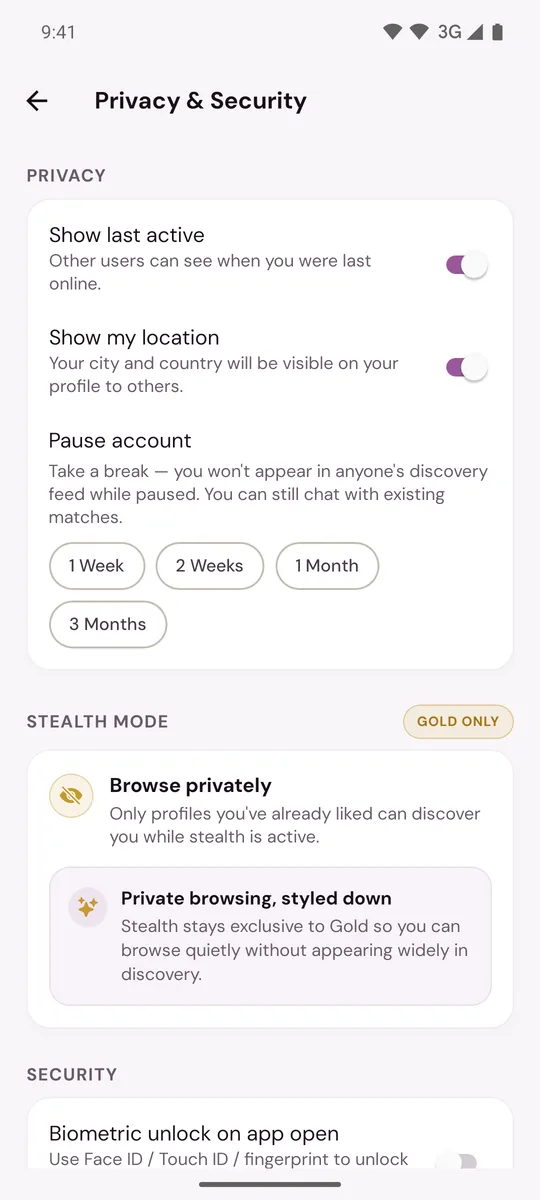
From then on nobody sees a label on your profile. You still see other people's labels. Turning it off only hides the label: it does not change how often or how early your profile is shown.
More on this and on hiding your city: Hide your last active time or location.
On Murudo Web
The labels are the same. In a chat, Murudo Web can also show Online or when your match was last active under their name. The Android app does not show this in chats. The switch is under Profile, Settings, Privacy, Show last active.
Updated 13 October 2026