
Hide your last active time or location
Turn off Show last active or Show my location in Privacy and security, and what other members see once you do.
- Android app
- Murudo Web
Two switches control this: Show last active and Show my location. Both are on when you join. Turn either one off and other members stop seeing that detail on your profile.
In the Android app
- Open the Profile tab and tap Settings.
Tap Privacy and security.
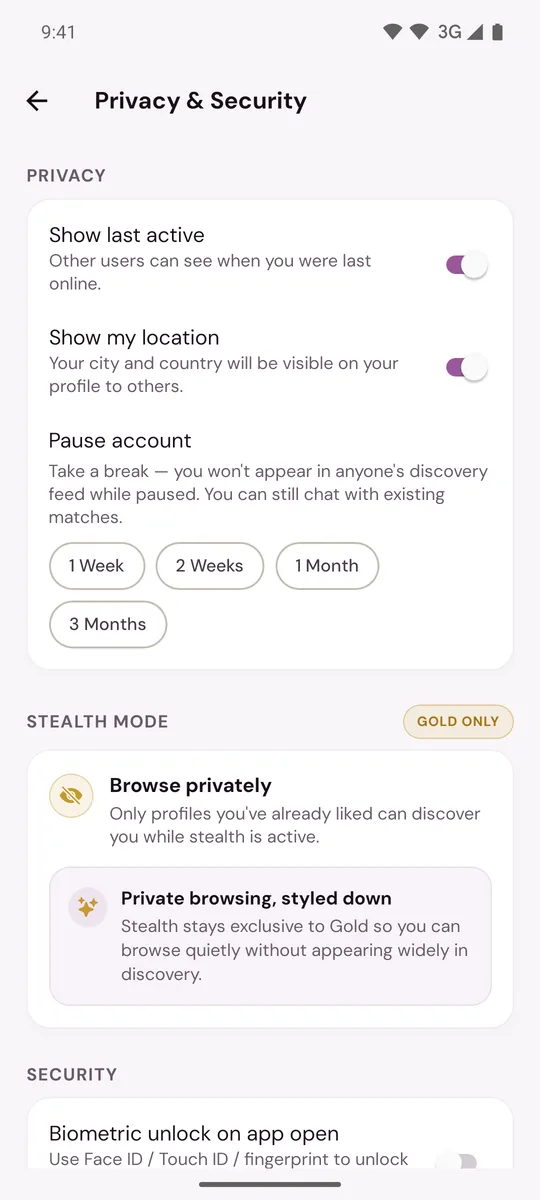
- Turn off Show last active, Show my location, or both.
The change is saved as soon as you move the switch. Turn it back on the same way.
On Murudo Web
- Open the Profile tab and tap Settings.
- Tap Privacy.
- Turn off Show last active, Show my location, or both.
What Show last active does
While it is on, people who see your profile can see roughly when you last used Murudo, in words such as "Active now", "Active today" or "Active this week". The exact time is never shown, and nothing is shown once you have been away for a week.
While it is off, other members see no activity line for you and you do not show as online.
It does not hide you from anyone. You still appear in For You and Daily as before. More in "Active today" and last active status.
What Show my location does
While it is on, your city and country are shown on your profile, with a rough distance from the person looking.
While it is off, your city, your country and the distance are all left off your profile.
Other members never see your exact location, whichever way the switch is set.
Turning the switch off does not stop Murudo using your location to suggest people near you, and other members' distance settings still apply to you. For how your location is set and updated, see How your location and city work.
If you want to be hidden altogether
These switches hide two details, not your profile.
- To stop appearing to new people for a while, pause your account.
- Gold members can use Stealth Mode, so that only people they have already liked can find them. See Browse privately with Stealth Mode.
Updated 13 October 2026