
How your location and city work
Murudo takes your city from your phone's location. You cannot type one in. What others see, and how to hide your city.
- Android app
- Murudo Web
Murudo takes your city from your phone's location. There is no box for typing a city, and you cannot choose one that is different from where your phone is. You can hide your city from other members.
How Murudo gets your location
- When you set up your profile, the Where are you based? step asks to use your current location. You can skip it.
- After that, if Murudo is allowed to use your location, it updates your city when you open the app and when you open the Profile tab. Pull down on the Profile tab to update it now.
- If Murudo is not allowed to use your location, the Profile tab shows a card with an Allow location or Open settings button. Under your name you may see Location not shared.
If you move or travel, your city follows your phone the next time it updates.
What other people see
Other members can see your city, or your region or country if no city was found, and roughly how far you are from them. They never see your exact position.
Hide your city
- Open the Profile tab and tap Settings.
- Tap Privacy and security.
Turn off Show my location.
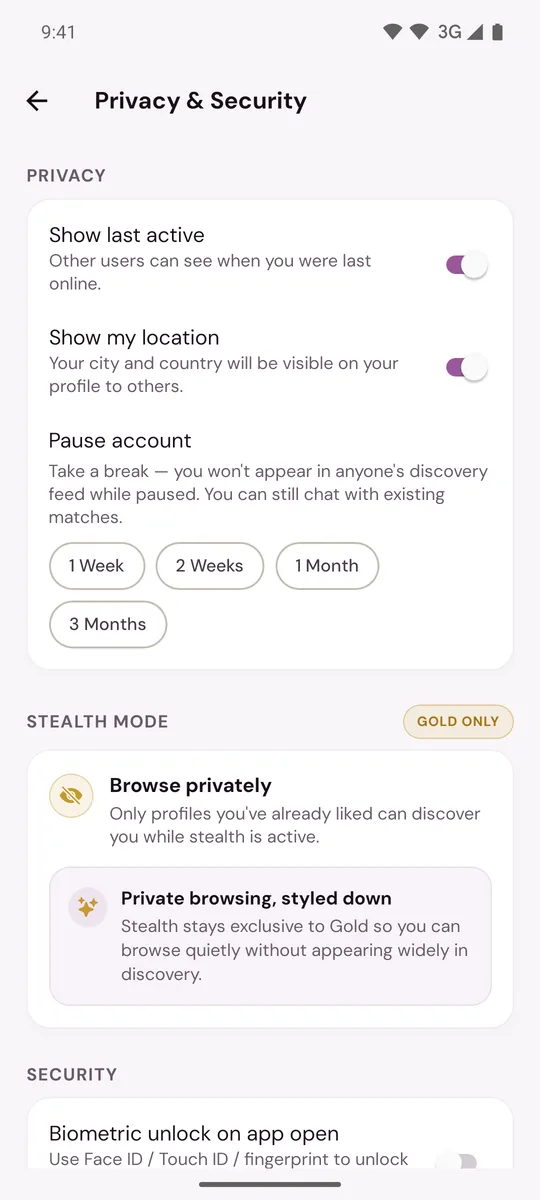
Your city and your distance are then hidden from other members. Murudo still uses your location to work out who is near you. See Hide your last active time or location.
What your location is used for
Your location decides who counts as near you. In For You, you can set a Max Distance in Match Preferences, and so can everyone else.
If your city is wrong
See My location or city is wrong.
On Murudo Web
Murudo Web uses your browser's location. Your browser asks for permission the first time. If you refused, open your browser's site settings for murudo.co and allow location.
To hide your city, open the Profile tab, tap Settings, then Privacy, and turn off Show my location.
Updated 13 October 2026