
Change your gender or who you want to date
Your gender is changed in Edit Profile. Who you want to date is a separate setting in Match Preferences, and one does not change the other.
- Android app
- Murudo Web
You change your gender in Edit Profile. Who you want to date is a separate setting in Match Preferences. Changing your gender leaves that setting exactly as it was, so check it afterwards.
Change your gender in the Android app
- Open the Profile tab and tap Edit Profile.
- Tap Gender.
- Tap Woman, Man, Non-binary or Other.
- In Update gender?, tap Update.
You see Gender updated. There is no limit on how often you can change it.
Change who you want to date in the Android app
- Open the Profile tab and tap Settings.
- Tap Match preferences.
Under Who You Want To Date, tap Women, Men, Non-binary or Everyone. You can choose more than one.
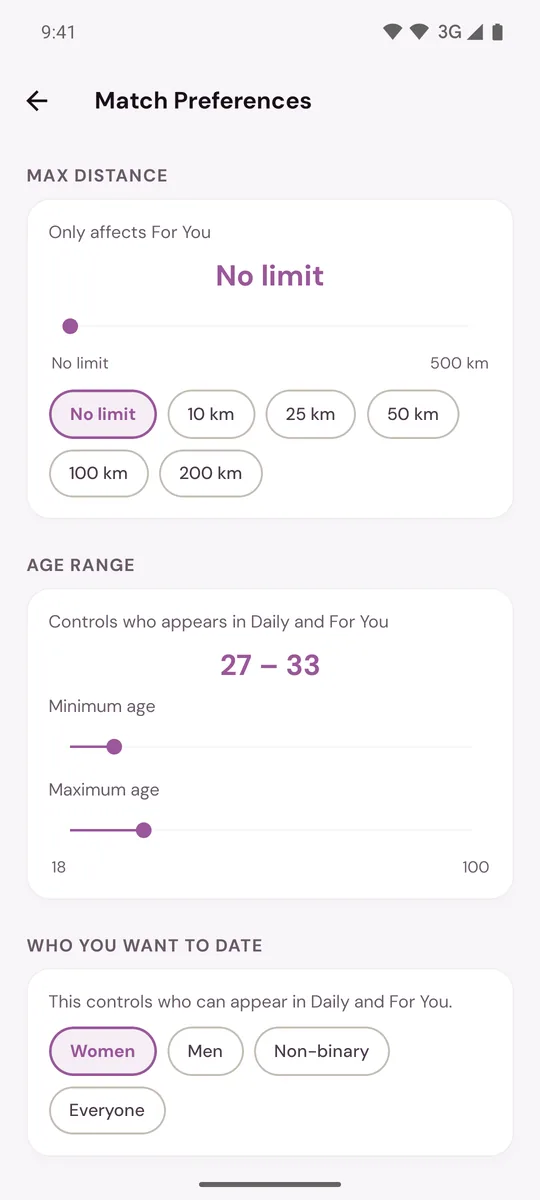
The choice is saved as soon as you tap it. It controls who can appear in Daily and For You. For the other settings on this screen, see Set your distance, age range and who you want to date.
Why both settings matter
Murudo shows two people to each other only when it fits both ways: your gender has to be one the other person wants to date, and theirs has to be one you want to date. So after you change your gender, check that Who You Want To Date still says what you mean.
On Murudo Web
To change your gender:
- Open the Profile tab and tap Edit Profile, then About You.
- Under Gender, tap the one you want and confirm. It is saved straight away.
To change who you want to date:
- Open the Profile tab and tap Settings.
- Tap Discovery Preferences.
- Choose under Who do you want to date?
Updated 13 October 2026