
Dating Insights and profile completeness
Insights shows how complete your profile is, what to add next, and your likes and matches from the last 7 days.
- Android app
- Murudo Web
Insights on the Profile tab shows how complete your profile is, a checklist of what to add, and how many likes and matches you had in the last 7 days.
Open Insights in the Android app
- Open the Profile tab.
Tap Insights. The Dating Insights screen opens.
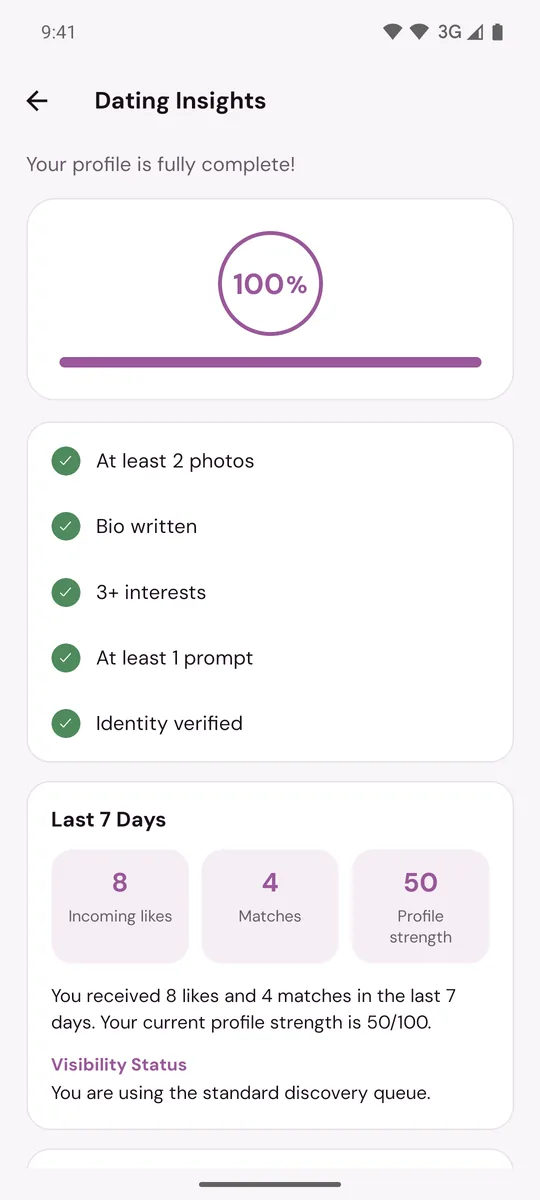
What the screen shows
- The percentage. How much of your profile is filled in. It is the same number as the Profile completeness card on the Profile tab.
- The checklist. At least 2 photos, a bio, 3 or more interests, at least 1 prompt, and identity verified. Tap a line without a tick to go and fix it.
- Tip. One suggestion about the next thing on the checklist.
- Last 7 Days. Your Incoming likes, your Matches and your Profile strength, with a sentence that sums them up.
- Visibility Status. Whether you are in the standard queue or have Plus or Gold priority.
- Profile Tips. Up to three things that would improve your profile.
The button at the bottom takes you to the next thing to do: Edit Profile or Verify Identity.
How Profile strength is worked out
Profile strength is a score out of 100. You get 25 for each of these:
- a bio of at least 20 characters
- 5 or more interests
- 3 prompts
- being verified
So a profile can be 100% complete and still have room to grow its Profile strength.
The Profile completeness card
The card appears on the Profile tab only while your profile is under 100%. It lists up to five things to fix, each starting with Required. Tap it to open Edit Profile. See Why is my profile not being shown?.
What Insights does not show
Insights does not show who liked you or who looked at your profile. For likes, see See who liked you.
If you see Refresh unavailable, your phone could not reach Murudo. Your profile progress still shows. Tap Try again when you are back online.
On Murudo Web
Open the Profile tab and tap Insights. The Profile Insights screen shows your Profile Strength as a percentage, with a checklist of what is done and what is missing. The 7-day numbers are in the Android app only.
Updated 13 October 2026