
See who liked you
The Likes tab lists people who liked you. On the Free plan their cards are blurred until you reveal one. Plus and Gold members see everyone.
- Android app
- Murudo Web
Open the Likes tab and stay on Liked You. On the Free plan the cards are blurred with a Reveal label. A card is clear once you reveal it, or when the person sent you a message with their like. On Plus or Gold every card is clear.
Look through your likes
- Tap the Likes tab. The number on the tab is how many likes are waiting.
Stay on Liked You.
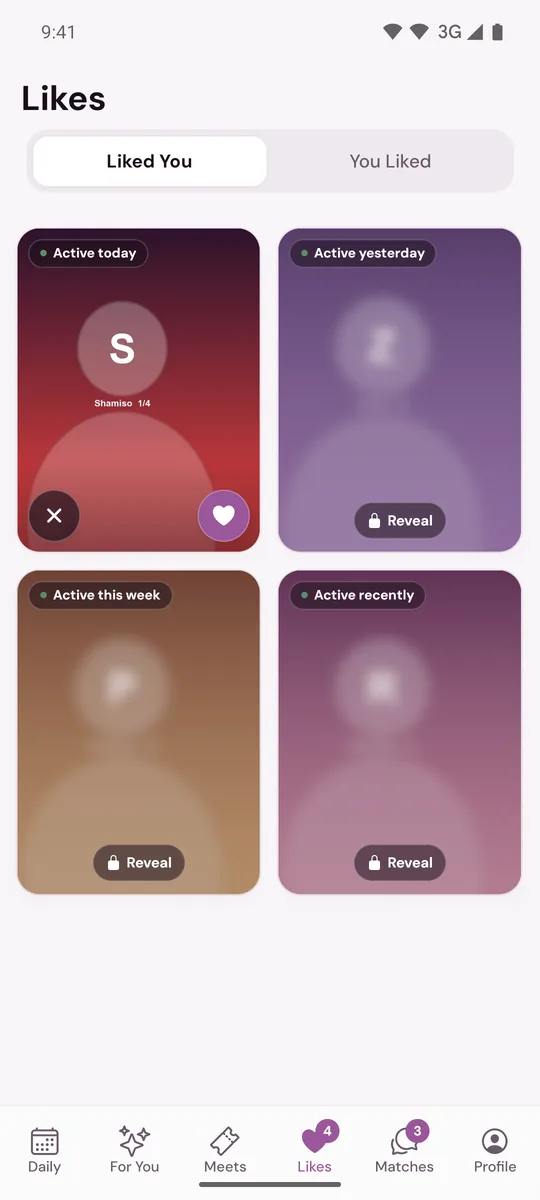
- On a clear card, tap the heart to like back or the X to pass. Tap the photo to open the full profile first.
Liking back makes a match at once. The app says You're connected and offers Send a message. On the Free plan a like-back uses one of your daily likes.
Blurred cards
Tap a blurred card and the app shows Hidden like with these choices:
- Reveal, if you have a Like Reveal. The button shows how many you have left. You earn a free one for every seven days in a row that you open Daily.
- See everyone with Plus opens Murudo Premium. A Plus or Gold pass unblurs every like for as long as it lasts.
- Not now closes the message.
A card you reveal stays clear. If you see an option to buy reveals, that is a one-off purchase offered on some accounts in the app downloaded from murudo.co and on Murudo Web. It is never offered in the app from Google Play.
On the Free plan the list holds your most recent likes. Older ones move in as you answer the cards on screen.
Cards that come with a message
Plus and Gold members can send one message with a like. Those cards are always clear, even on the Free plan, and sit at the top. Tap the card to read the message. Reply to match and open the chat, or go back and tap the X to pass. See You Liked and Direct Reach-outs.
Why a like disappeared
A card leaves the list when you like back or pass, and also when the other person takes the like back, pauses or deletes their account, or is removed from Murudo. The app may say This like is no longer available.
On Murudo Web
The Likes tab at murudo.co/app has the same Liked You and You Liked tabs. Tapping a blurred card opens a sheet with See everyone with Plus.
Updated 18 October 2026