
What a boost does and how to use one
A boost puts your profile first in For You for 30 minutes and gives it priority in Daily for 24 hours. You start one from the Profile tab.
- Android app
- Murudo Web
A boost puts your profile in front of more people for a short time: first in For You for 30 minutes, plus priority in Daily for 24 hours. You start it yourself from the Profile tab, when it suits you.
Start a boost
Open the Profile tab and scroll down to Boost Your Profile.
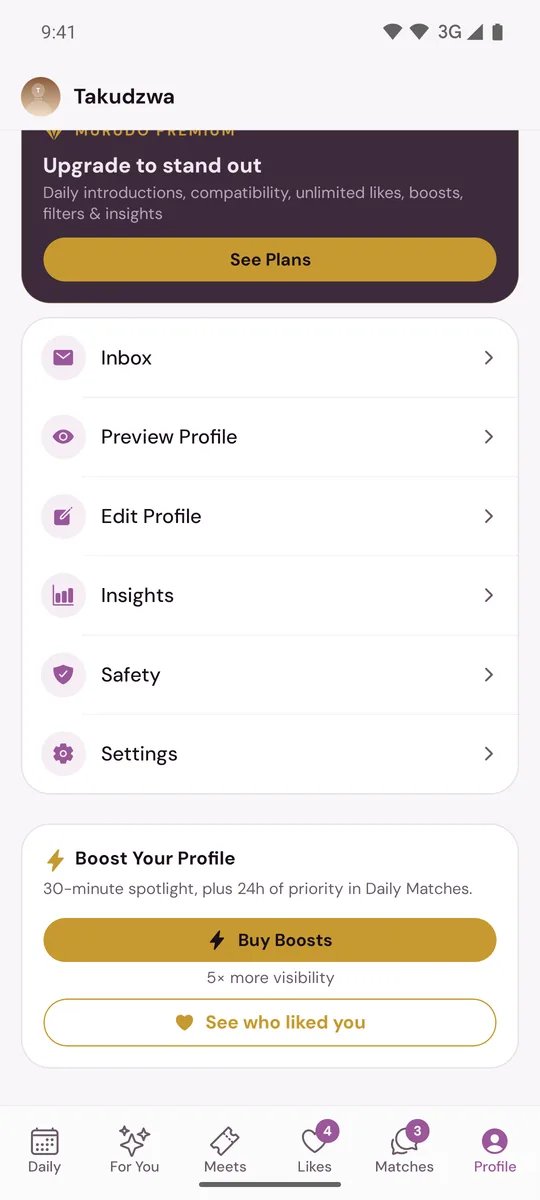
- Tap Use Boost. On a Plus or Gold pass the button reads Use Boost (Plus) or Use Boost (Gold).
The boost starts at once, with no second question. The card shows Boost active until and the time it ends.
If the button says Buy Boosts, you have none to use. See Buy boosts.
What happens while it runs
- For 30 minutes, your profile is shown ahead of others in For You.
- For 24 hours, your profile has priority when Murudo picks Daily introductions. While the 30 minutes are running, your Daily card carries a Boosted tag.
- You are still only shown to people whose preferences you fit. A boost brings more views. It cannot promise likes or matches.
The rules
- One boost at a time. While one is running, the card shows when it ends in place of the button.
- Boosts that come with your pass are used before boosts you bought. See Boosts included with your pass.
- A boost cannot be paused, stopped or moved once it has started.
- If you tap Use Boost (Plus) or Use Boost (Gold) and the app says No boosts available, the boosts included with your pass are used up and you have none bought. A 24-hour pass and a Forever plan include no boosts.
Afterwards
For two days after a boost ends, the card shows Last boost with how many people saw you and how many likes you got.
Get more from a boost
- Start it when you have time to stay on Murudo and answer the likes that come in.
- Fix your profile first. A boost shows more people the profile you already have. See Tips for a profile that gets replies.
On Murudo Web
The Profile tab has the same Boost Your Profile card. If you have no boosts, it opens the boost packs.
Updated 20 October 2026