
Like Reveals: what they are and how to get one
A Like Reveal uncovers one blurred card in Likes. How to earn free ones, how to use one, and why Plus and Gold members do not need them.
- Android app
- Murudo Web
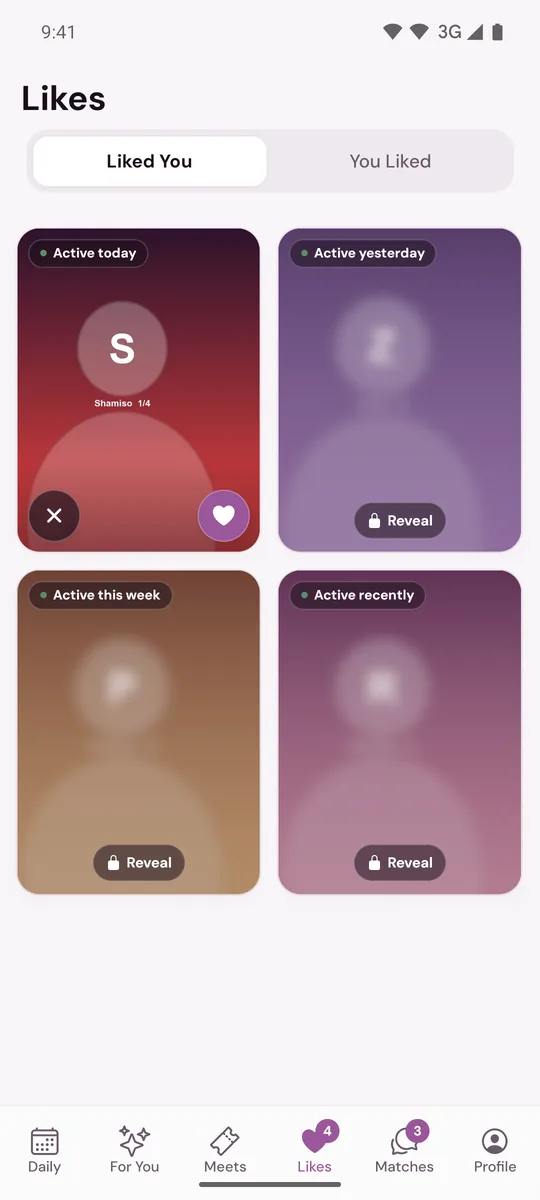
A Like Reveal uncovers one blurred card in Likes, under Liked You, so you can see who liked you and like them back. You earn a free one each time you open Daily seven days in a row. Plus and Gold members see every like clearly and do not need Reveals.
Get a free Reveal
- Keep a Daily streak. Open the Daily tab every day. Every seventh day in a row adds one Reveal to your account: on day 7, day 14, day 21 and so on. A line on the Daily screen tells you when one has been added. The streak only counts while Daily is on, your Daily questions are answered and your profile is complete. A missed day starts the streak again. See How Daily works.
- Open Murudo Web from your Home Screen. The first time you open Murudo Web from your phone's Home Screen while signed in, one Reveal is added. This happens once for each account. See Add Murudo to your iPhone Home Screen or Add Murudo Web to an Android Home Screen.
Use a Reveal
- Open the Likes tab and stay on Liked You. When you have Reveals, an eye icon beside the title Likes shows how many.
Tap a blurred card marked Reveal.
- On Hidden like, tap Reveal. The button shows how many you have left.
- The app says Revealed and tells you how many Reveals remain.
The card is now clear and stays clear. Tap the heart to like back, which makes a match at once, or the X to pass. Tap the photo to read the full profile first.
If the app says This like is no longer available, the person took the like back or their profile is no longer being shown. The card is removed and no Reveal is used.
Reveals you have not used stay on your account. They are removed if you delete your account.
If you have no Reveals
Tapping a blurred card still shows Hidden like, with See everyone with Plus and Not now. A Plus or Gold pass unblurs every like for as long as it lasts, and uses none of your Reveals.
If you see an option to buy Reveals there, that is a one-off purchase offered on some accounts, in the app downloaded from murudo.co and on Murudo Web. The price is shown before you pay. Reveals are never sold in the app from Google Play, but Reveals you have earned can be used there.
On Murudo Web
- Open Likes and tap a blurred card. It says Tap to reveal.
- If you have a Reveal, the sheet tells you how many are ready. Tap Reveal now.
- A message tells you how many Reveals are left.
If you have none, the sheet has See everyone with Plus. If buying Reveals is switched on for your account, a button above it offers a Reveal for sale, with the price on the button.
Updated 18 October 2026