
Set your distance, age range and who you want to date
Change Max Distance, Age Range and Who You Want To Date in Match Preferences. Distance only affects For You. Age range affects Daily and For You.
- Android app
- Murudo Web
Match Preferences is where you choose how far away people can be, what ages you see, and who you want to date. Open it from Settings, or tap the sliders icon at the top of For You.
Change your preferences
- Open the Profile tab, tap Settings, then Match preferences.
- Under Max Distance, drag the slider, or tap No limit, 10 km, 25 km, 50 km, 100 km or 200 km. The slider goes up to 500 km.
- Under Age Range, set Minimum age and Maximum age, anywhere from 18 to 100.
Under Who You Want To Date, tap Women, Men, Non-binary or Everyone. You can choose more than one, and one must always stay chosen.
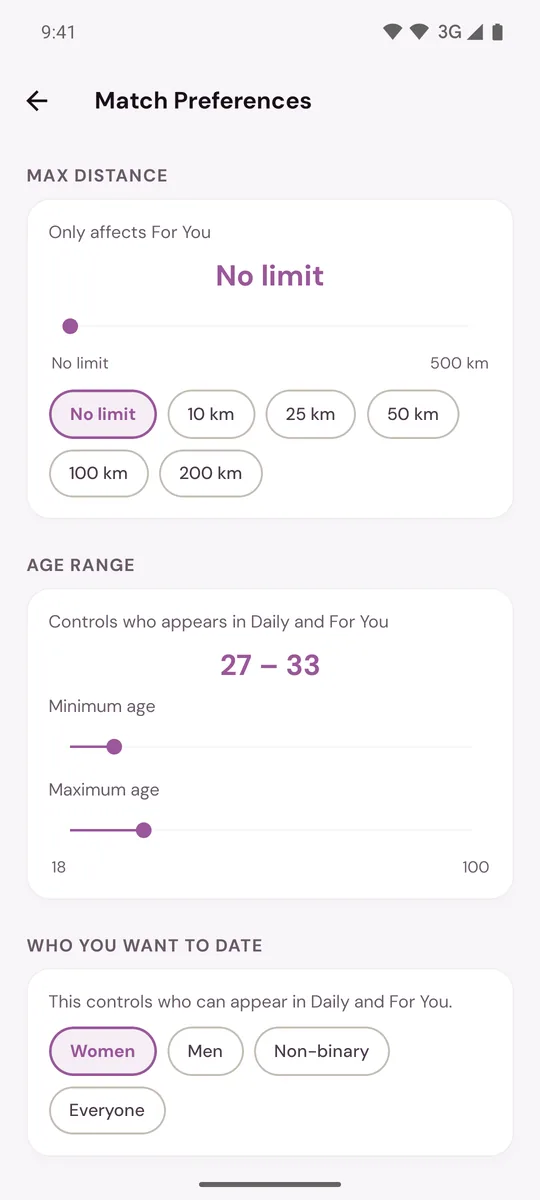
There is no Save button. Each change applies as soon as you make it.
What each setting does
| Setting | Where it applies | Before you change it |
|---|---|---|
| Max Distance | For You only | No limit |
| Age Range | Daily and For You | Your own age, 3 years either side |
| Who You Want To Date | Daily and For You | What you chose at sign-up |
- Age Range starts narrow. If you are 30 and have never moved the sliders, you only see people aged 27 to 33. Widen it if you want to see more people.
- Who You Want To Date works both ways. You see people of the genders you chose, and only those who chose to date your gender.
- Distance needs your location. If Murudo does not know where you are, a distance limit cannot be applied. See How your location and city work.
Things to know
- If very few people fit, For You can show people beyond your distance and says so in a banner: We widened your filters to show more people. Your age range and who you want to date are never widened.
- Distance and age range are saved on the phone or browser where you set them. If you also use Murudo Web, or move to a new phone, set them again there. Who you want to date is saved to your account.
- Height Display on the same screen only switches between metres and feet. It is not a filter.
- There is no filter for verified profiles, height or anything else here. Plus and Gold members get five more in Advanced filters.
On Murudo Web
Open Profile, then Settings, then Discovery Preferences, or tap the sliders icon at the top of Discover. The settings are Who do you want to date?, Maximum Distance and Age Range. Distance reads Unlimited when there is no limit.
Updated 13 October 2026