
Pause your account to take a break
Hide your profile for 1 week, 2 weeks, 1 month or 3 months without losing your matches or chats, and resume whenever you like.
- Android app
- Murudo Web
Pausing hides your profile from new people for 1 week, 2 weeks, 1 month or 3 months. You keep your account, your matches and your chats, and you can resume at any time.
Pause your account in the Android app
- Open the Profile tab and tap Settings.
- Tap Privacy and security.
Under Pause account, tap 1 Week, 2 Weeks, 1 Month or 3 Months.
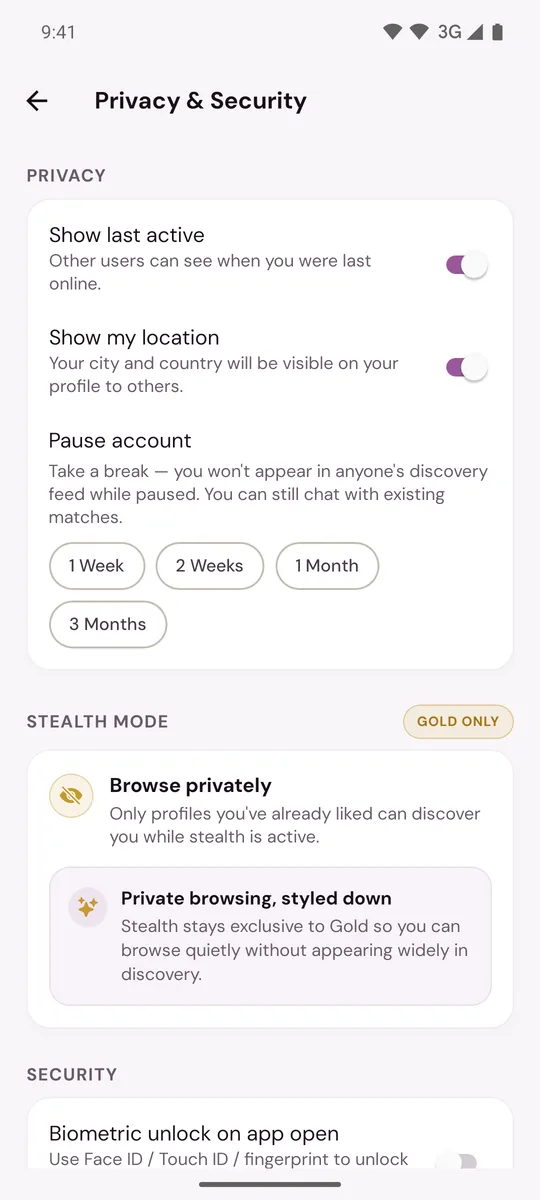
The pause starts the moment you tap; there is no second question. You will see Account Paused, and the screen then shows the date your pause ends.
While you are paused
- Nobody finds you in For You or Daily. Likes you sent before pausing are hidden from the other person until you resume.
- You can still open your matches and chat with them.
- You cannot like or pass. For You shows Your account is paused, and you get no new Daily introductions.
- Murudo stops sending you reminder notifications.
- Your profile and photos stay exactly as they are.
- Premium does not pause. A pass keeps counting down, and a Google Play subscription still renews.
Resume
Open Privacy and security again and tap Resume Account. You will see Your account is active again. If you do nothing, the pause ends by itself on the date shown.
On the paused For You screen, the button Open Privacy & Security takes you to the same place.
To make a pause longer or shorter, resume and then pause again.
On Murudo Web
Open Profile, tap Settings, then Privacy. The same four buttons are under Pause account, and Resume Account appears while you are paused.
Is pausing what you need?
- To leave for good, delete your account. That cannot be undone.
- To hide only when you were last online or your city, see Hide your last active time or location.
- Gold members who want to keep browsing without being widely shown can use Stealth Mode.
Updated 13 October 2026