
Log out of Murudo
Tap Log out at the bottom of Settings. It happens at once with no confirmation, and your profile stays visible to other members.
- Android app
- Murudo Web
Open the Profile tab, tap Settings, scroll to the bottom and tap Log out. You are logged out at once. Murudo does not ask you to confirm.
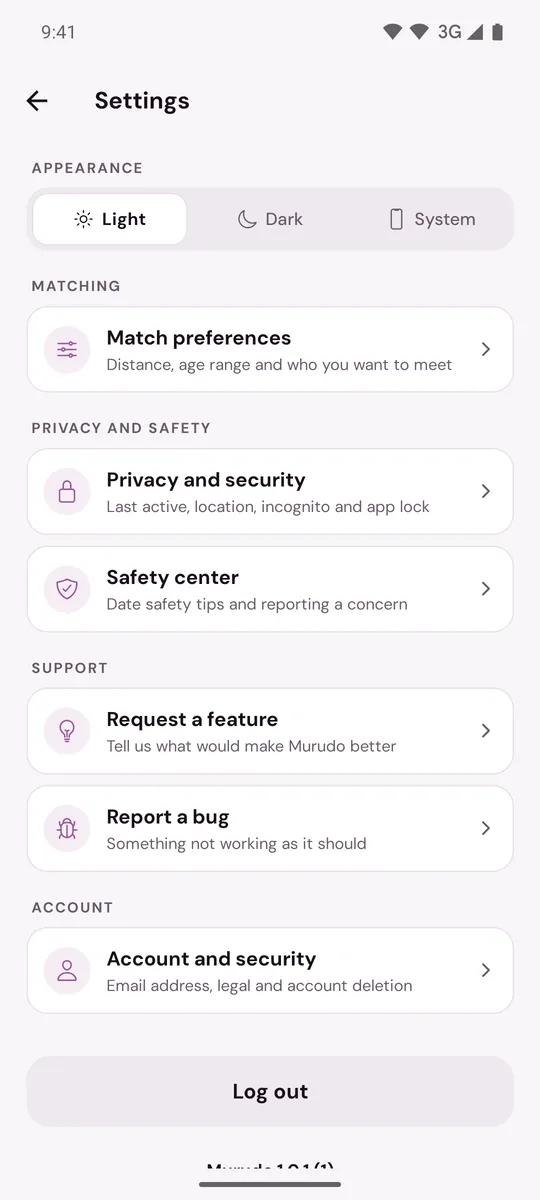
There is a second Log out button at the bottom of Account and security, and one on the Murudo is locked screen if you use the app lock.
Before you log out
- Make sure you can get back in. Know whether you use Google, an email and password, or a username and password. With a username account, also keep your recovery contact and phrase.
- Let waiting messages send first. A message that was still waiting for a connection is not sent after you log out.
What logging out does
- This phone stops getting Murudo notifications.
- Chats and matches saved on this phone are cleared from it. They stay in your account and come back when you log in.
- Only this phone or browser is logged out. Other devices stay logged in.
- Your profile is not hidden. People can still see you, like you and message you.
To hide your profile, pause your account. To leave Murudo, delete your account. Removing the app from your phone does neither.
On Murudo Web
Open Profile, tap Settings, then Account, and tap Log Out. It is also immediate.
Log out of every device
There is no list of devices and no "log out everywhere" button. To log out a phone or browser you no longer have, change your password. Every other device is logged out, and the one you are using stays logged in. If you sign in with Google and have no Murudo password, adding one under Add password does the same. A passkey is not logged out by a password change: remove it on Murudo Web under Settings, Account, Passkeys.
On a shared or borrowed phone
Log out every time you finish, and in a browser close the tab as well. If other people often pick up your own phone, lock the app instead of logging out each time.
Updated 13 October 2026