
Keep your account secure
Use a strong password, never share a code or PIN, lock the app on your phone, and know what Murudo will never ask you for.
- Android app
- Murudo Web
Use a password you use nowhere else, never give a code or PIN to anyone, and lock the app if other people handle your phone. Those three habits stop most account problems.
What Murudo will never ask you for
- Your Murudo password.
- A 6-digit code from an email. You type codes into the Murudo app or Murudo Web yourself. You never send them to a person.
- The recovery phrase of a username account.
- Your EcoCash, OneMoney or InnBucks PIN. Murudo has no place to type a PIN. When you pay with mobile money, you approve the payment on your own phone, in the prompt or app from your provider.
Murudo writes to you in the app's Inbox and by email from addresses ending in foretellhq.com. Support is Contact Murudo in the Inbox and [email protected]. There is no phone line, and nobody from Murudo will message you privately on WhatsApp about your account. Murudo's public WhatsApp channel and group are listed at https://murudo.co/links/. If someone contacts you another way and says they are Murudo, do not reply. See Spot a romance scam.
Use a strong password
- Follow the five password rules and make it one you do not use on any other site.
- Change it if you think someone else knows it. Changing your password logs out every other phone and browser.
- If you use a passkey on Murudo Web, look at Settings, Account, Passkeys now and then. It shows the date your passkey was saved. Remove one you did not save.
Lock the app on your phone
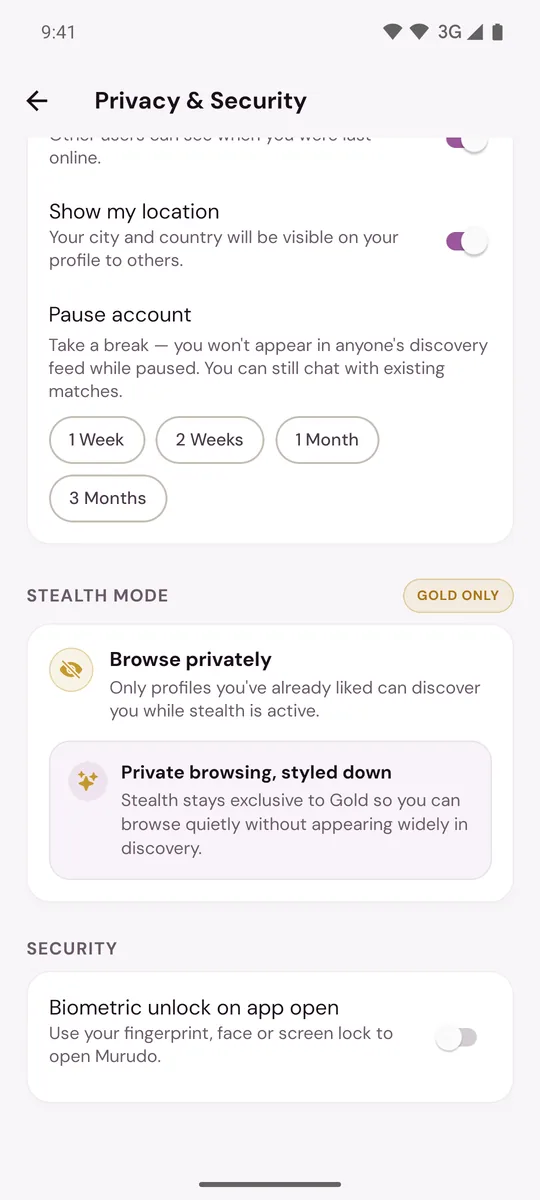
In the Android app, open Settings, then Privacy and security, and turn on Biometric unlock on app open. Murudo then asks for your fingerprint, face or screen lock when it opens, and again after 5 minutes in the background. Steps are in Lock Murudo with your fingerprint or face.
Keep your way back in
- Email accounts: check that the email under Settings, Account and security is one you can still open. Reset codes go there.
- Google accounts: anyone who can open your Google account can open Murudo. Protect it with a strong password and Google's 2-Step Verification.
- Username accounts: keep your username, recovery contact and recovery phrase written down somewhere private. See Recovery details for username accounts.
On a phone that is not yours
Log out when you finish. Logging out is immediate and does not hide your profile.
In your chats
Treat it as a warning sign when a match asks for money, for a code that was sent to you, or for a payment "to verify" you. Read Someone asked me for money.
Updated 13 October 2026