
Is this message really from Murudo?
Murudo writes to members in the in-app Inbox and by email from foretellhq.com addresses. It never asks for a password, a code, a PIN or money.
- Android app
- Murudo Web
A real message from Murudo reaches you in one of two places: the Inbox on your Profile tab, or an email from an address ending in @foretellhq.com. A message that says it is from Murudo and asks for your password, a code, a PIN or money is not from Murudo, wherever it arrives.
Where Murudo writes to you
The Inbox. Open the Profile tab and tap Inbox. Replies from support and announcements from Murudo are here.
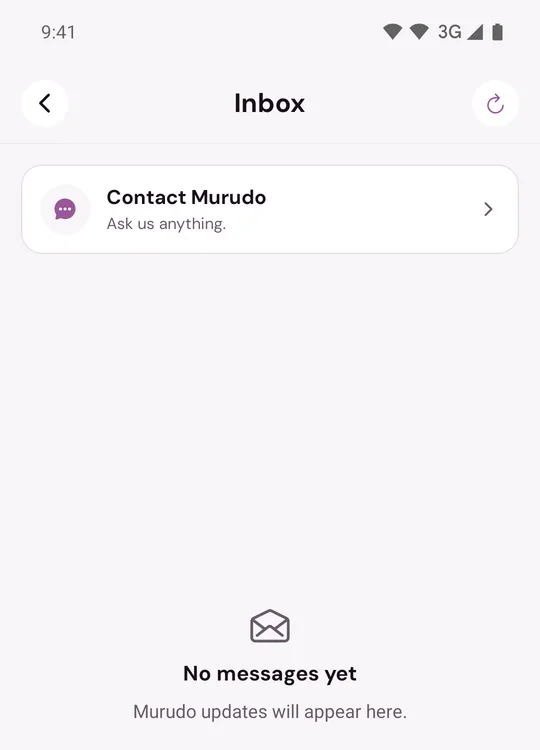
- Email. Codes and notices about your account come from Murudo Accounts at [email protected]. Reminders and news come from Murudo Updates at [email protected]. Support writes from [email protected]. The buttons in these emails open murudo.co.
- Notifications from Murudo itself. Tapping one opens Murudo.
What Murudo never asks for
- Your Murudo password, or the recovery phrase of a username account.
- A 6-digit code from an email. You type a code into Murudo yourself. You never send it to a person.
- Your EcoCash, OneMoney or InnBucks PIN.
- Money sent to a person or to a phone number, for any reason. You pay for Murudo only on its own payment screens. See Is it safe to pay on Murudo?
Support may ask for your account email or username, a payment reference or a screenshot. That is normal.
Who is not Murudo
- A match who says they work for Murudo. Murudo does not contact you through a chat with a match, so that person is not acting for Murudo.
- A caller, or a private WhatsApp message, from "Murudo support". Murudo has no support phone line, and its support team does not message members privately on WhatsApp.
- An email from any other address, or one that asks you to reply with a code or a password.
- Another website that asks for your Murudo login. Log in only in the app and at murudo.co/app.
Murudo's public pages on social media and WhatsApp are listed at https://murudo.co/links/. Nobody from Murudo will message you privately from them to ask for any of the things above.
What to do with a suspicious message
- Do not reply, do not tap its links and do not send anything.
- Take a screenshot of the message and its sender.
- If it came from a match, report them and choose the reason about scams, such as Spam or scam, then block them. Do not unmatch first, because unmatching deletes the chat. See Report someone.
- If it came by email or from outside Murudo, send it to support@foretellhq.com, or use Contact Murudo in your Inbox.
If you already answered
- You gave your password or a code: change your password now, then read I think someone else has used my account.
- You gave your PIN or sent money: contact your mobile money provider or your bank straight away. See Someone asked me for money.
Updated 13 October 2026