
Pay with OneMoney, InnBucks, card or bank
How to pay for a pass or boosts with OneMoney, InnBucks, or a card or bank account through Paynow.
- App from murudo.co
- Murudo Web
In the Android app downloaded from murudo.co and on Murudo Web you can also pay with OneMoney, InnBucks, or a card or bank account. All of them go through Paynow. Start the same way as with EcoCash: choose a pass or a boost pack, then pick the method under Payment method.
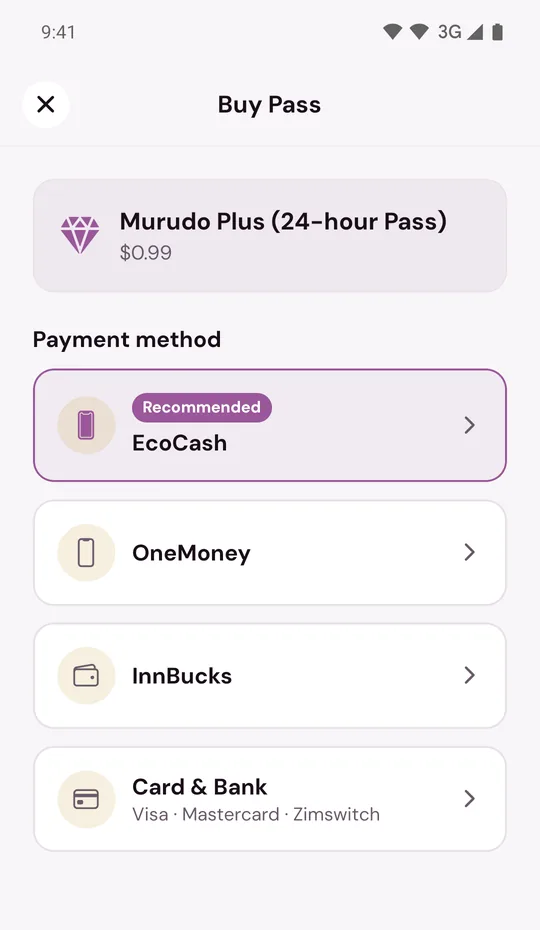
| Method | What you need | How you approve |
|---|---|---|
| OneMoney | A NetOne number with OneMoney | Enter your OneMoney PIN in the prompt on your phone |
| InnBucks | An InnBucks account and the InnBucks app | Approve the payment in the InnBucks app |
| Card & Bank | A Visa, Mastercard or Zimswitch card, or a bank account | Pay on the Paynow page that opens |
OneMoney
- Tap OneMoney.
- Type your NetOne number under Phone number and tap Send USSD prompt.
- Enter your OneMoney PIN in the prompt on your phone.
OneMoney works with NetOne numbers. If you type an Econet number, the app tells you to switch to EcoCash. OneMoney also cannot be used for very small amounts: when an amount is too small, the app says so and asks you to pay with EcoCash for that item.
InnBucks
- Tap InnBucks.
- Type your phone number and tap Get InnBucks code.
- If you see Approve in InnBucks with a code, tap Open InnBucks and approve the payment there. The time the code expires is shown under it. If a Paynow page opens instead, finish the InnBucks payment on that page.
- Come back to Murudo and wait on the screen. InnBucks can take a little longer than EcoCash to confirm.
Card & Bank
- Tap Card & Bank. Under the name you see Visa · Mastercard · Zimswitch.
- Tap Continue. A Paynow page opens.
- Pay on the Paynow page, then close it. Murudo checks the payment and shows Payment Successful.
You type your card details on Paynow's page, not in Murudo. Murudo does not see or store them.
- If the Paynow page does not open, you see Resume Paynow. Tap Resume Payment instead of starting a new payment. On Murudo Web, allow pop-ups for murudo.co first.
- If you close the page without paying, you see Card payment didn't finish. You can tap Use EcoCash or start again.
- Murudo cannot see why a bank refused a card. Ask your bank, or use another method.
If you are outside Zimbabwe
EcoCash, OneMoney and InnBucks ask for a Zimbabwean mobile number. From abroad, use Card & Bank, or use the app from Google Play, which takes payment through your Google account. See Why do I not see EcoCash (or Google Play)?
The same rules as EcoCash
Passes paid these ways are paid once and do not renew. If a payment is still being checked, do not pay again: see What "Checking your payment" means.
Updated 13 October 2026