
Harassment and unwanted messages
What to do when someone on Murudo will not stop messaging, insults you or threatens you. Report them, then block them.
- Android app
- Murudo Web
You do not have to reply to anyone, and you do not have to put up with insults, pressure, sexual messages you did not ask for, or threats. Report the person, then block them. They are never told who reported them, and once blocked they cannot contact you on Murudo.
Stop it in the Android app
- Take screenshots of the messages if you can. You cannot open the chat after you block.
- Open the chat and tap their name at the top.
Tap Report and choose Harassment or abuse. Say what happened under Add more details (optional), then tap Submit Report.
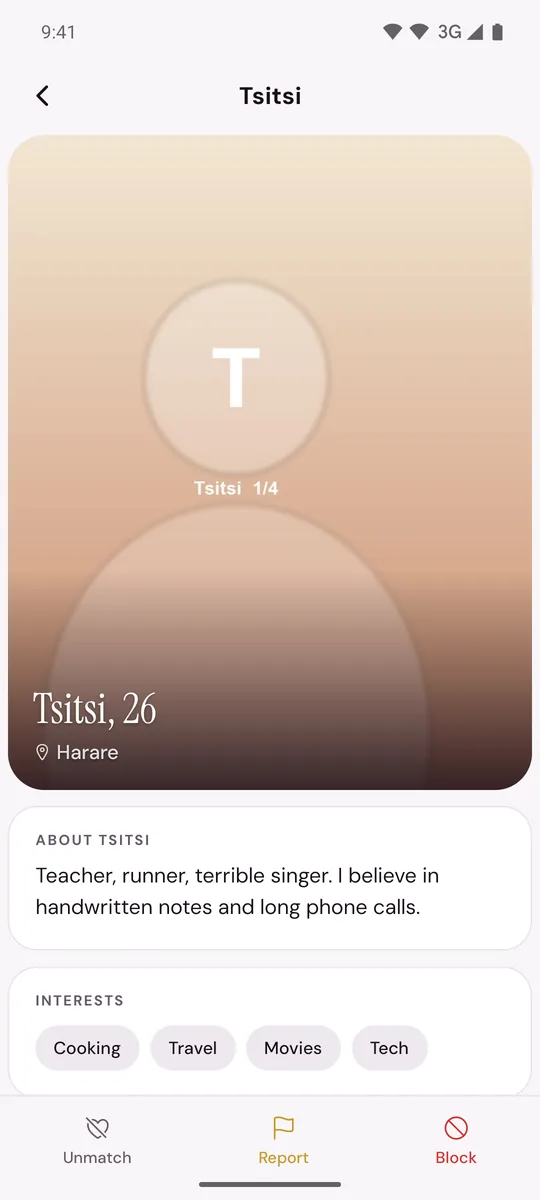
- Back on their profile, tap Block, then Block again to confirm.
On Murudo Web
- Open the chat and tap their name at the top.
- Tap Report, choose Harassment as the Reason, add what happened under Details (optional) and tap Submit Report.
- Tap Block, then Confirm.
If you only want the chat to end
If the person has broken no rule and you have simply lost interest, you can unmatch or block without reporting. Not replying is also an answer.
If it carries on
- They come back with a new profile. A block applies to one account. Report the new profile and say it is the same person.
- They reach you on other apps. Block them there too. Murudo can act on their Murudo account only.
- They threaten to hurt you, or turn up where you live or work. Contact your local emergency services or the police, and keep your screenshots.
- They threaten to share private pictures. Read Someone shared or threatened to share my private pictures.
If you need a break
You can pause your account so that you stop appearing to new people while you keep your matches. You can also hide your last active time or location.
Updated 13 October 2026