
Someone I blocked or reported is back with a new profile
A block covers one account. If the same person returns on a new profile, report that profile, say it is the same person, then block it.
- Android app
- Murudo Web
Report the new profile and say in the details that it is the same person as before, then block it. A block only covers the one account you blocked, so it does not stop a new one. Murudo is one account per person, and the Community Guidelines say: "Do not create duplicate accounts to evade enforcement." Our team can act on the new account as well as the old one.
Before you report
Take a screenshot of the new profile: the name, age, city and photos. On For You the profile leaves your screen as soon as you tap Report. Do not like the profile or reply to the person.
In the report, write:
- that this is the same person as a profile you blocked or reported before
- the first name, age and city on the old profile, and roughly when you blocked or reported it
- what the person did then
- how you know it is the same person: the same photos, the same words, or they told you
Report and block in the Android app
On For You or Daily
- On For You, tap the shield icon at the top. On Daily, tap the introduction to open the profile, then tap the shield icon at the top right.
- Tap Report. On For You the button has their name on it.
- On Report an Issue, choose the issue that fits what they did. If nothing fits, choose Other concern.
Under Describe what happened, write the details listed above.
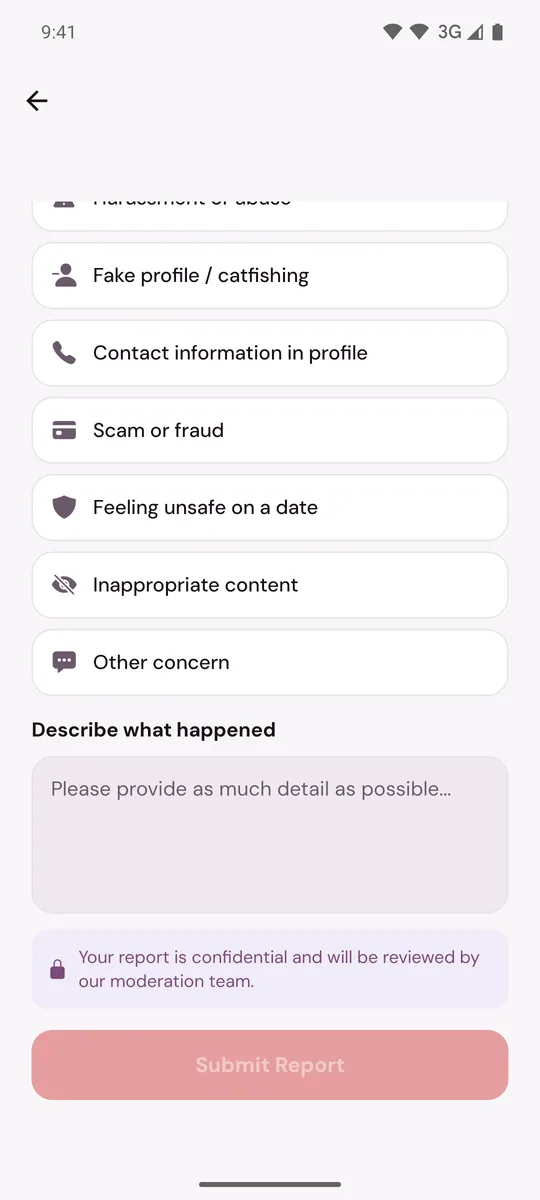
- Tap Submit Report.
On Daily, tap Go Back after the report, tap the shield icon again and tap Block. On For You the profile has already left your screen, so block it if it is shown to you again or the person likes you.
If you matched with them
Open the chat and tap their name at the top. Tap Report, choose a reason, write the details under Add more details (optional) and tap Submit Report. Then tap Block on the same profile. Do not unmatch: unmatching deletes the chat, so our team can no longer read it.
If they liked you
A profile opened from Likes, Liked You has a block icon at the top right but no report button. Report first from Profile, Safety, Report a Safety Concern, giving the first name, age and city on the new profile. Then open the profile and block it.
On Murudo Web
- A match: open the chat and tap their name at the top. Tap Report, choose a Reason, write the details under Details (optional) and tap Submit Report. Then tap Block and Confirm.
- Someone on Discover: tap the shield icon, tap Report, then tap a reason. That report is sent at once with no room for details. Add them straight after: open Profile, Safety, SOS Report, choose a reason, and under Details say that you have just reported a profile on Discover, give its first name, age and city, and explain why you believe it is the same person. Tap Submit Report.
Send your screenshots
A report is text only. To send screenshots, open Profile, Inbox, Contact Murudo and attach one to your message, or email support@foretellhq.com.
A person on our team reads every report. See What happens after you report someone, and Block someone for every way to block.
Updated 13 October 2026