
How matching works
A match is made when two people both show interest. The three ways to match on Murudo, and where your matches are kept.
- Android app
- Murudo Web
A match is made when two people both say yes to each other. From then on the two of you can chat in the Matches tab. A like on its own never opens a chat.
The three ways to match
- You both like each other. You tap the heart on someone in For You, or like someone back in Likes, and they have liked you too. In For You the screen shows IT'S A MATCH with Send a message and Keep browsing. In Likes it says You're connected.
- A Daily introduction is accepted. One of you reaches out from Daily. The other finds the request in Matches, on the Daily tab, and taps Interested. See Daily requests in Matches.
- A reach-out gets a reply. Plus and Gold members can send one message to a person they liked who has not answered yet. It becomes a match when that person replies. See You Liked and Direct Reach-outs.
Where to find your matches
- Open the Matches tab.
Stay on Primary to see everyone you have matched with. Each row shows the last message, when it was sent and how many messages you have not read.
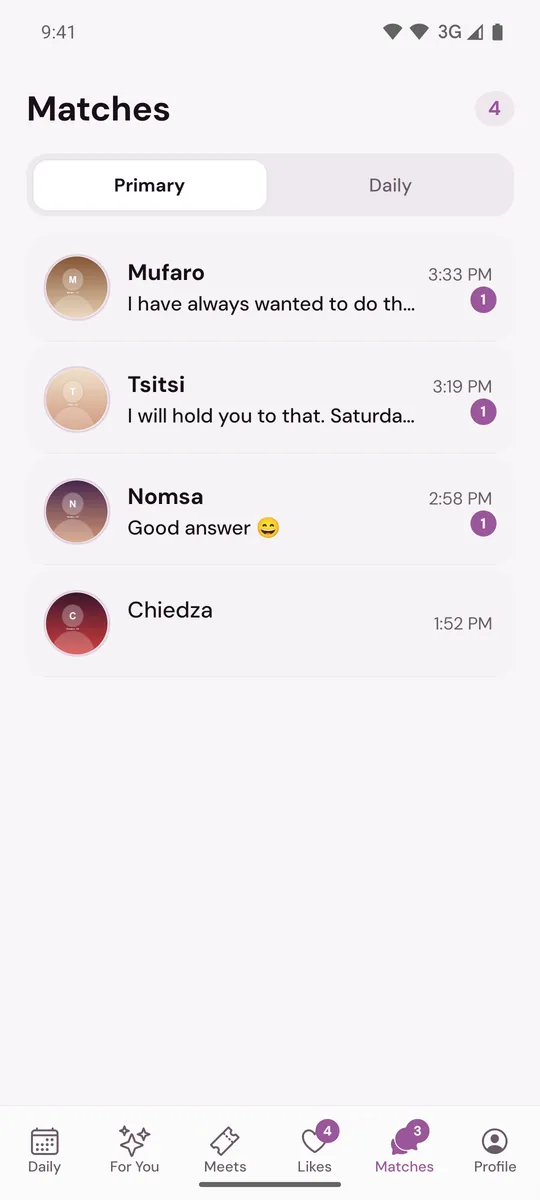
- Tap a row to open the chat, or tap the photo to open the person's profile.
A small Daily tag marks a match that started as a Daily introduction. If notifications are on, Murudo also tells you when you get a new match.
Good to know
- Either person can send the first message. See Send your first message.
- Matches do not run out with time. A match stays until one of you unmatches or blocks the other, or one of the accounts is deleted or removed. See Why did my match or chat disappear?
- No matches yet? Read I am not getting matches.
On Murudo Web
Matching works the same way. The tab is called Matches and the screen is headed Messages, with the same Primary and Daily tabs. A mutual like shows It's a Match with Send a message and Keep browsing.
Updated 13 October 2026