
My account was suspended or banned
What the Account Suspended and Account Banned screens mean, what you can still do, and how to ask for the decision to be reviewed.
- Android app
- Murudo Web
If Murudo opens on Account Suspended or Account Banned, our team has restricted your account for breaking the rules. You can still log in to read the reason and send an appeal, but you cannot use the rest of Murudo until the restriction is lifted.
What the screen shows
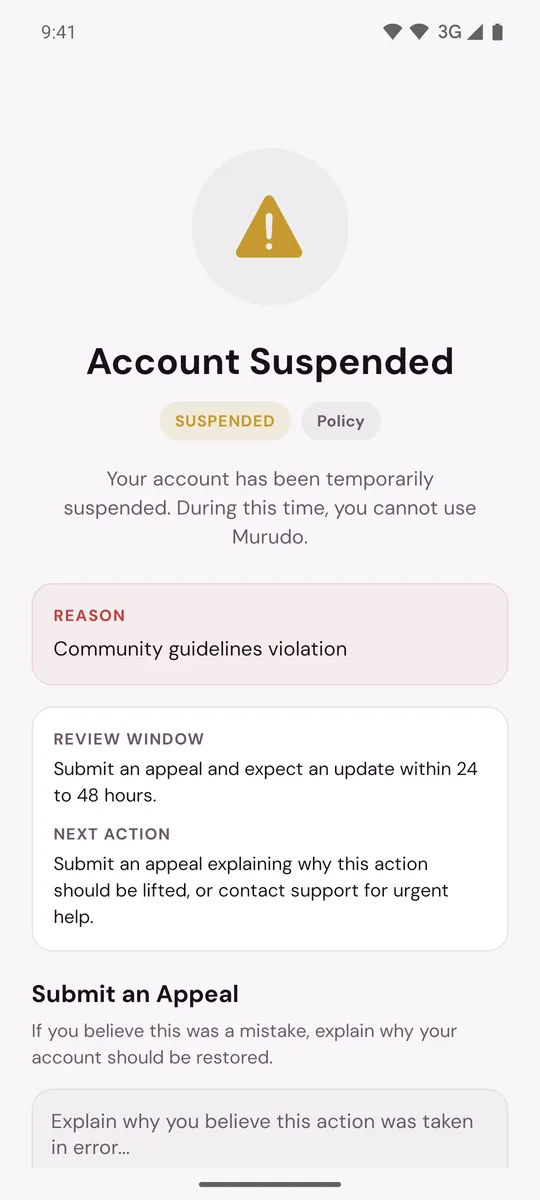
- The title: Account Suspended or Account Banned.
- A Reason box with the reason our team recorded.
- If you have been suspended before, a line saying which suspension this is, and that after 3 suspensions your account will be permanently banned.
- Review Window and Next Action, which tell you what to do next.
- Submit an Appeal, or a note that your appeal is under review.
- Contact Support via Email, which opens an email to our support team.
- Appeal History, once you have sent an appeal.
- Log Out.
If your account has an email address, we also email you. The subject is "Murudo: Your account has been suspended" or "Murudo: Your account has been permanently banned".
Suspended or banned: the difference
- Suspended is temporary. The screen does not show an end date. A suspension ends when our team lifts it, so send an appeal if you want it looked at again.
- Banned is permanent. It stays unless an appeal succeeds.
- A third suspension becomes a permanent ban.
What changes while your account is restricted
- You cannot browse, like, match or chat.
- Your profile is not shown to other members in For You or Daily.
- A ban ends a Forever plan, with no refund. This is in the Terms of Service. For more, read What happens to Premium if I delete my account or am banned?
Do not open a new account while you are suspended or banned. Making another account to get around enforcement is against the Community Guidelines.
What to do
- Read the Reason box.
- If you believe the decision was a mistake, send an appeal from the same screen.
- If you need to add something or the form does not work, tap Contact Support via Email, or write to support@foretellhq.com from the email address on your account. Give your username or email and say what happened.
On Murudo Web
The screen is titled Account Suspended for both a suspension and a ban. It shows the reason, an Appeal box with Submit Appeal, and Log Out. An appeal sent from Murudo Web reaches our team in the same way as one sent from the app.
Murudo Web does not show the other parts listed above, such as Appeal History and Contact Support via Email. To reach support from the web, write to support@foretellhq.com from the email address on your account.
If you see "Account unavailable" or "Account disabled"
These are different. Account unavailable, or the message "Account disabled. Contact support." when you log in, means the account cannot be used at all, and there is no appeal form. Email support@foretellhq.com from the address on the account. See I cannot log in.
Updated 13 October 2026