
Find your way around Settings
What each row in Settings does in the Android app and on Murudo Web, and where to find the things that are not in Settings.
- Android app
- Murudo Web
To open Settings, go to the Profile tab and tap Settings. It is in the list under Safety.
Settings in the Android app
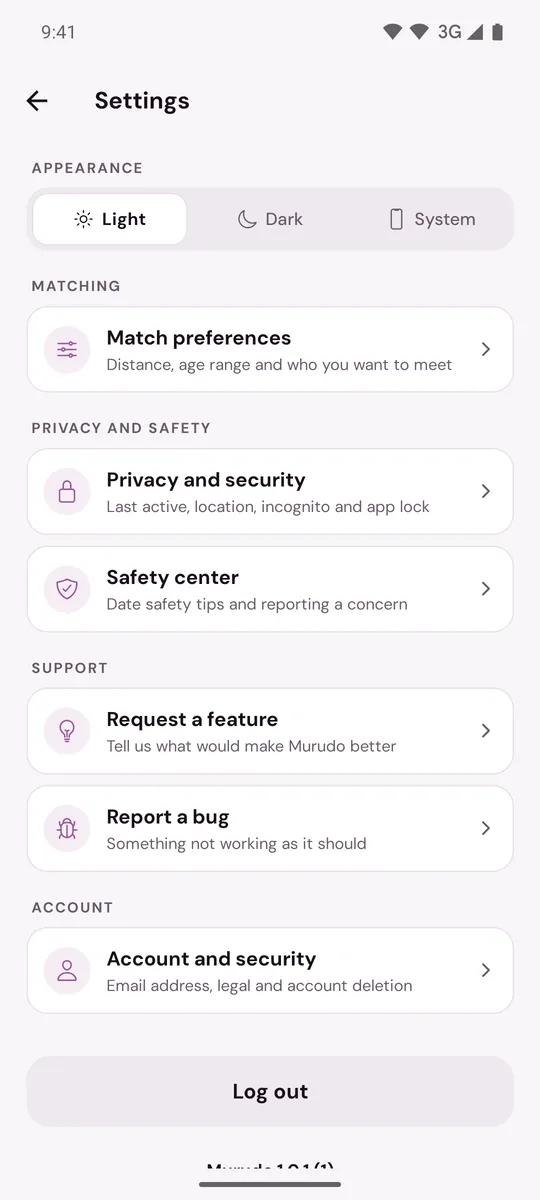
- Appearance: choose Light, Dark or System. See Turn dark mode on or off.
- Sound: Play profile songs decides whether a profile's song starts by itself when you open it. See Add a song to your profile.
- Match preferences: distance, age range, who you want to date, advanced filters, and whether heights show in metres or feet. See Set your distance, age range and who you want to date.
- Privacy and security: hide your last active time or your city, pause your account, Stealth Mode, and the app lock.
- Safety center: date safety tips and a way to report a concern. See What is in the Safety Center.
- Request a feature and Report a bug: send an idea or a problem to the team. See Request a feature or report a bug.
- Account and security: your email address, your password, account deletion, and the Terms and Privacy Policy.
- More from Foretell: Murudo Weddings and Cozy Apart, the other apps made by the company behind Murudo. Tapping one opens its page outside Murudo.
- Log out: signs you out straight away. There is no "Are you sure?" step.
The last line on the screen is your version, for example Murudo 1.0.1 (64). Support may ask for it. See Find your Murudo version.
Things that are not in Settings
- Notifications: there are no notification switches inside the app. You turn them on or off in your phone's own settings. See Turn Murudo notifications on or off.
- Your profile: photos, prompts and details are under Profile, Edit Profile.
- Your plan: tap See Plans or Manage on the Profile tab.
- Support: open Profile, Inbox, Contact Murudo. See Contact Murudo support.
On Murudo Web
Open Profile, then Settings. The rows have different names:
- Discovery Preferences: who you want to date, maximum distance, age range and Available for Daily Matches.
- Advanced Filters: for Plus and Gold members.
- Privacy: Show last active, Show my location, Pause account and Stealth Mode.
- Appearance: Theme, Height display and Play profile songs.
- Account: your email address, Browser notifications, Passkeys, Password, Murudo Premium, Delete Account and Log Out.
- More from Foretell: links to Murudo Weddings and Cozy Apart, which open in a new tab.
The last line reads Murudo Web followed by its version.
Murudo Web has no app lock and no feature or bug form. To report a problem from the web, use Inbox, Contact Murudo.
Updated 21 October 2026