
Google Play or the direct download: which one?
The two Android versions of Murudo differ in how they update and how you pay. Choose one and keep it, because they cannot update each other.
- App from Google Play
- App from murudo.co
If your phone has Google Play, use the app from Google Play: it updates by itself. Use the direct download from https://murudo.co/ if your phone has no Google Play. If you already have Murudo, keep the version you have, because the two cannot update each other.
What is different
| App from Google Play | App downloaded from murudo.co | |
|---|---|---|
| Where you get it | Google Play | https://murudo.co/ |
| Updates | Google Play updates it for you | You download the new file from murudo.co |
| How you pay | Through Google Play | Through Paynow: EcoCash, OneMoney, InnBucks, card or bank |
| 7-day and 30-day passes | Renew until you cancel in Google Play | Never renew by themselves |
| Forever plans | Not sold here | Sold here while spots last |
Both versions also get small updates by themselves when you open the app.
Everything else is the same: your profile, Daily, For You, Likes, Matches, chat, Meets and the safety tools. Your account works in both, and on Murudo Web.
Which one do I have?
- Open the Profile tab and tap See Plans. If you already have Premium, tap Manage instead.
- Choose a pass and tap the button with its price. Nothing is charged yet.
Look at the next screen:
- Purchase with Google Play means you have the app from Google Play.
- A list of payment methods with EcoCash at the top means you have the app downloaded from murudo.co.
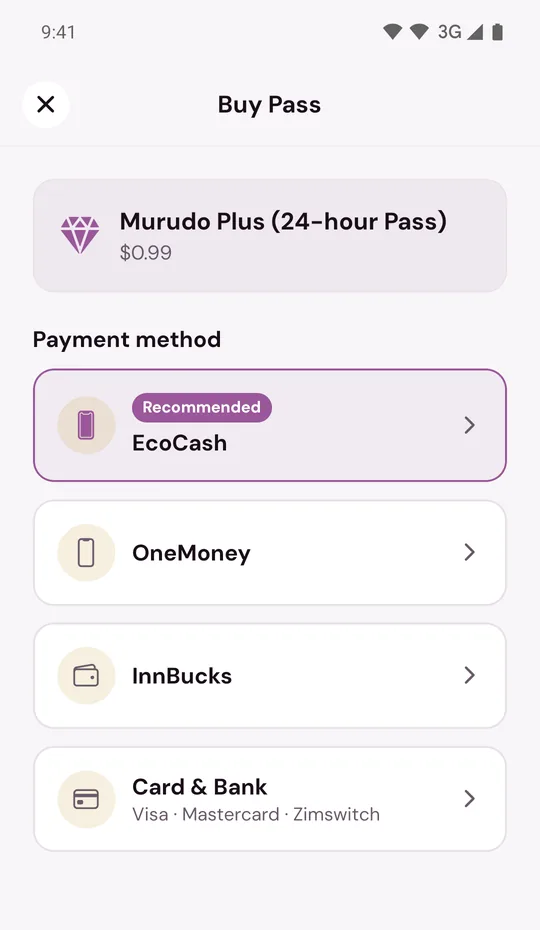
- Go back without paying.
Why you should not mix them
The two versions are the same app to your phone, so it can only hold one of them. Google Play cannot update the downloaded app, and the downloaded file cannot install over the Google Play app.
Changing from one to the other
You can change, but you have to remove Murudo from the phone first.
- If you have a pass that renews through Google Play, decide whether to keep it. It keeps renewing until you cancel it in Google Play. See Cancel a Google Play subscription.
- Remove the Murudo app from your phone. This does not delete your account.
- Install the other version: from Google Play or from murudo.co.
- Open it and tap Sign in. Log in the same way you did before.
Your profile, matches, chats and any Premium time are kept with your account, not on the phone.
Updated 13 October 2026